Comments let your team, and people you share the doc with, discuss a doc without changing its text. A comment can point at a specific passage or at the doc as a whole.
Who can do thisEvery team role (Lead, Member and Viewer), and workspace owners and admins
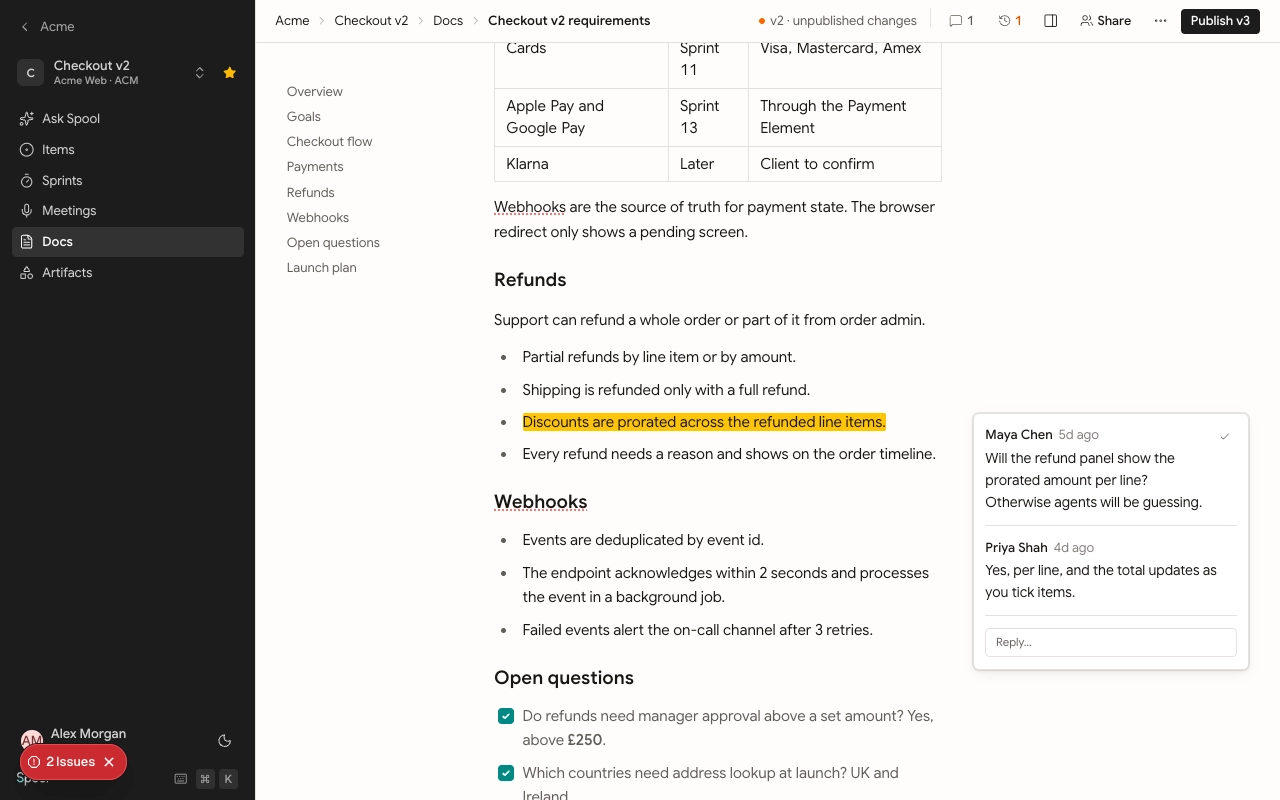
Comment on a passage
- Select the text you want to talk about.
- Click Comment in the toolbar that appears.
- Write your comment and post it.
The passage gets a highlight, and the thread appears in the margin beside it. Click a highlight to bring its thread forward, or click a thread to find its passage.
Comment on the whole doc
For feedback that isn’t about one passage, open Comments at the top right and use Comment on the whole doc… at the bottom of the panel.
Reply, edit and delete
Reply inside any open thread. You can edit your own comments. You can delete your own comments, and team members who can delete docs (Leads by default) can delete anyone’s comment.
When you mention someone with @ in a comment, they get a notification. When someone replies to your comment, you get one too.
Resolve a thread
Once a thread is settled, click Resolve on it. Resolved threads leave the margin and their highlight goes away, but nothing is lost.
The Comments panel has two tabs:
- Open shows every thread that still needs attention. The count on the Comments button at the top counts these.
- Resolved shows threads that are done. Click Reopen on one to bring it back.
The person who started a thread is notified when someone else resolves it.
When the text changes
Comments stay attached to their passage as people edit around it. If the passage is deleted, the thread stays open in the Comments panel with the original quote, marked “Original text removed”, so the conversation isn’t lost.
Comments from people outside the team
When you share a doc with someone and give them Comment access, they can comment on the published version in the same way: select text, or comment on the whole doc. Their comments appear in the same threads your team sees, so you can reply to them right in the doc.
People outside the team can reply to any thread, and resolve or reopen only the threads they started. People who open a public link can read but can’t comment. See Share a doc.