Most work starts in a conversation. In Spool you can mark a meeting as the Origin of an item or a doc, so the decision and the work that came from it stay connected.
Why link work to a meeting
Weeks later, someone opens ACM-42 and asks why it exists. If the item’s origin is the “Kickoff call” meeting, they’re one click from the notes, the transcript and the exact moment it was agreed. Nobody has to dig through chat or ask around.
Before you start
The meeting has to be filed in the same project as the item or doc. A meeting in Needs a project is private to you, so it can’t be an origin yet. File it in a project first.
A good routine after a call:
- Open the meeting and read the Next Steps at the end of the notes.
- Create an item for each action you want to track, in the same project.
- Set the meeting as each item’s origin, as below.
Set a meeting as an item’s origin
- Open the item.
- In the Links section, click the + button.
- Choose Origin.
- Search for the meeting and pick it. Only meetings and docs in the item’s project are listed.
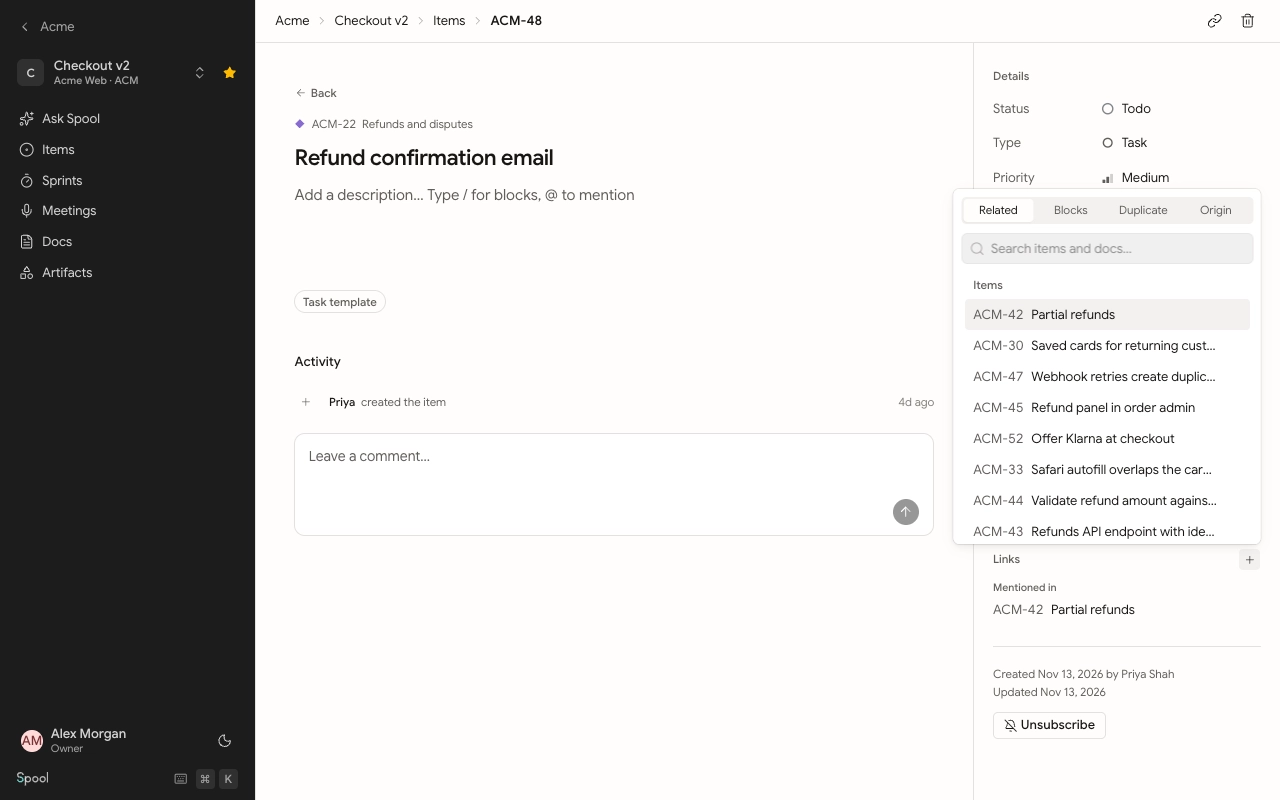
The link shows on the item under Origin. Click it to open the meeting.
Set a meeting as a doc’s origin
Specs and write-ups often come out of a call too.
- Open the doc and go to the Details tab in its side panel.
- Click Add link.
- Under Set as origin, pick the meeting.
The meeting then appears under Origin in the doc’s details.
Link a meeting from a project’s files
You can also link an artifact, such as a slide deck shared on the call, to a meeting in the same project. Meetings are listed alongside items and docs when you add a link to an artifact.
Work with coding agents
Agents connected to Spool act as you and can see the same meetings you can. They can list and read a meeting’s notes and transcript, rename it, change its tags or file it into a project, and link items back to it as their origin. That’s handy for asking an agent to draft items from a call’s Next Steps while keeping the link to the meeting.